By Data RecoveryUpdated on January 21, 2026
Many smartphone users have encountered such troubles: accidentally deleting apps with important data, or wanting to retrieve purchased apps or pre-installed system apps after device hardware damage or factory reset. Don’t worry—this article will detail 2 free and effective recovery solutions. Whether you use an iPhone or Android phone, you can easily retrieve target apps and related data.
If your iPhone has iCloud backup enabled, you can directly restore all pre-installed system apps (such as Music, Photos, Messages, etc.) from the backup. However, note that this method will reset all existing data and settings on your phone—we recommend making an extra backup of current data before proceeding. Here are the detailed steps:
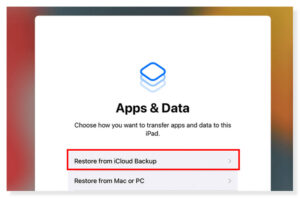
Step 1:Open the “Settings” app on your iPhone, go to “General”, find “Transfer or Reset iPhone”, and tap “Erase All Content and Settings”.
Step 2:After erasure, the phone will automatically enter the “Apps & Data” setup screen—select “Restore from iCloud Backup” here.
Step 3:Enter your Apple ID and password to log in to iCloud, then choose the most relevant backup from the list (judge by date and size).
Step 4:Follow the system prompts to log in to your Apple ID again and wait for the recovery to complete. After successful recovery, pre-installed system apps will be restored automatically, and you can also retrieve other purchased apps from the App Store.
Tips: Keep the network stable during the recovery process—the time required depends on the backup size and network speed; if you forget your Apple ID password, you can retrieve it through official channels.
If you haven’t backed up app data via iCloud or iTunes, you can use the professional tool iPhone Data Recovery Software. Compatible with Windows and Mac systems, this software can recover messages, photos, videos, and other data from apps like WhatsApp, Messages, and Kik. It also offers three recovery modes, with safe operation that won’t cause secondary data loss. Here’s how to use it:


Step 1:Download and install iPhone Data Recovery Software on your computer. After opening it, select the “Recover from iOS Device” mode.
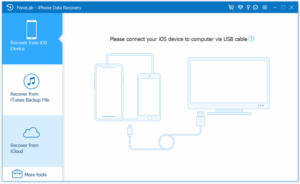
Step 2:Connect your iPhone to the computer with a USB cable. Once the software recognizes the device, click “Start Scan”—you may need to enter your phone password for authorization during the scan.
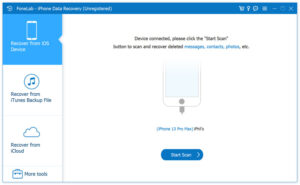
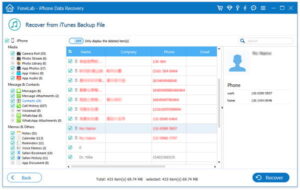
Step 3:After the scan is complete, view recoverable app data in the “Applications” column on the left. You can preview the files and check the content you want to recover (supports “Select All”), then click the “Recover” button.
If you’ve purchased apps from Google Play, you don’t need to pay again—you can reinstall them on any Android device using the same Google account. This method is simple to operate, and some apps that support cloud synchronization can even restore data automatically. Here are the steps:
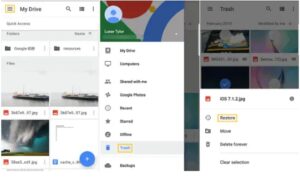
Step 1:Open the Google Play Store on your Android phone and tap your profile icon in the upper right corner.
Step 2:Select “Manage apps & device” from the dropdown menu, then switch to the “Manage” tab.
Step 3:Tap the dropdown arrow next to “Installed” and select “Not installed” to view all purchased apps that are not currently installed.
Step 4:Find the app you want to recover, tap “Install”, and wait for the download and installation to complete.
Note: Some app data will be lost when the app is deleted. To recover such data, you need to use a professional recovery tool.
To retrieve deleted app data (such as chat records from Facebook and WhatsApp) on your Android phone, you can try Android Data Recovery Software. This tool supports retrieving deleted files from phone storage, SD cards, and tablets, with a simple interface that’s easy for beginners to use. Here’s the step-by-step guide:
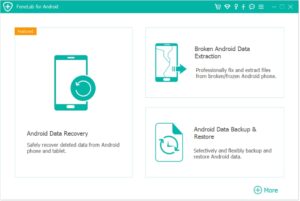
Step 1:Download and launch Android Data Recovery Software on your computer, then select the “Android Data Recovery” mode.
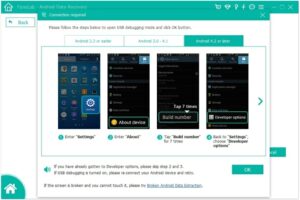
Step 2:Connect your Android device to the computer with a USB cable. Follow the software prompts to enable “USB Debugging Mode” on your phone, then click “OK”.
Step 3:The software will automatically scan for recoverable data on the device. After the scan, select the type of app data you want to recover (e.g., “App Messages”) and click “Next”.
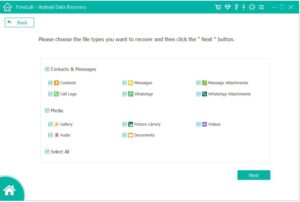
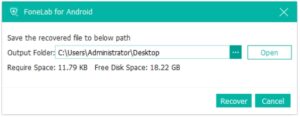
Step 4:Preview the scan results, check the target app data, and click “Recover” to save the data to your computer.
Common Questions About Phone App Recovery
How to find recently deleted apps on Android?
Open the Google Play Store, tap your profile icon → “Manage apps & device” → “Manage” → switch “Installed” to “Not installed” to view and reinstall.
How to reinstall apps on iPhone?
Open the App Store, enter the app name in the top search bar, find it, and tap the download icon to reinstall quickly.
How to find hidden apps on iPhone?
Swipe left on the home screen to enter the App Library, then enter the app name in the search bar to find and open it.
Can deleted apps always be retrieved?
Yes. As long as you have downloaded/purchased the app from the App Store (iPhone) or Google Play (Android), you can retrieve it through the corresponding platform.
Why can’t some apps be restored from backup?
Possible reasons: The app has been removed from the app store; the app is incompatible with the current phone system version; the backup file is corrupted or incomplete.
This article provides 2 free app recovery solutions for iPhone and Android users respectively: iOS users can restore pre-installed system apps via iCloud backup or retrieve app data with Aiseesoft tools; Android users can reinstall purchased apps via Google Play and recover lost data with professional software. All methods have clear steps and require no professional skills—you can easily retrieve deleted apps and important data by following the guidelines. If you encounter problems during operation, feel free to leave a comment for assistance!
Copyright © 2025 DatasRecovery All rights reserved.
 iPhone Data Recovery
  iPhone Unlocker
  Android Data Recovery
  Broken Android Data Extraction
  Android Unlocker
  Data Recovery (Windows/Mac)


