By Data RecoveryUpdated on January 22, 2026
Viber does not have a built-in data recording or backup function. Once you accidentally delete photos, videos, and other media files in chats, you need to rely on third-party iPhone Viber data recovery software to solve the problem. This article will detail 3 efficient recovery solutions—whether you have backed up data in advance or not, you can successfully retrieve lost photos and videos from Viber without overwriting existing data. These methods are applicable to various data loss scenarios such as accidental deletion, system failure, device freeze, and factory reset, helping you easily resolve Viber data loss issues.
iPhone Data Recovery is a professional Viber recovery tool designed specifically for iOS devices. It can directly extract and recover deleted Viber media files from iPhone without relying on backups.
Core Advantages of the Software:
1.Ultra-high Security: Verified through millions of actual tests, the software will not modify, save, or overwrite the original data of iOS devices during the recovery process, ensuring the safety of other files throughout.
2.Easy to Operate: Featuring a clean blue-and-white interface, all recovery function modules are clearly arranged. You can complete the operation by following on-screen prompts, no professional technical skills required.
3.High Recovery Success Rate: Leading in the recovery success rate of Viber photos and videos for common scenarios such as accidental deletion, system crash, and device freeze, it can efficiently retrieve lost data.
4.Wide Compatibility: Supports iOS 12 and above latest systems, compatible with mainstream iPhone models including iPhone XS/XS Max/XR/X/8/8 Plus/7, and can also be used for Viber data recovery on other iOS devices.
5.Comprehensive Function Coverage: In addition to Viber, it can recover messages, contacts, and various attachments from multiple apps such as WhatsApp, Messenger, Line, WeChat, and QQ.


Detailed Operation Steps:
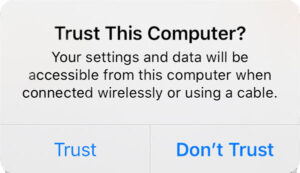
Step 1:Download and install the software, then launch it. Connect your iPhone to the computer via a USB data cable. At this time, a “Trust This Computer” prompt will pop up on your iPhone—click “Trust” to complete the device connection.
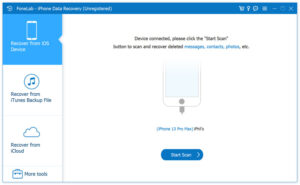
Step 2:Select the “Recover from iOS Device” section on the software’s main interface and click the “Start Scan” button. The software will quickly detect all files on the device, including existing files and deleted historical files.
Step 3:After the scan is complete, check “Viber”, “Viber Attachments”, and “Viber Call History” in the left file list. Double-click a file to preview details. To recover photos and videos, directly select “Viber Attachments”; if the target files are not found, you can check the “App Photos” or “App Videos” sections. After selecting the files to be recovered, click “Recover” to finish the retrieval.
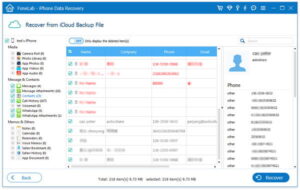
If your iPhone has been backed up via iTunes before, you can extract Viber media files from the backup using the aforementioned recovery software without overwriting existing data on the device.
Detailed Operation Steps:
Run iPhone Data Recovery software and select the “Recover from iTunes Backup Files” section on the main interface, which is specifically designed to extract Viber data from iTunes backups.
The software will automatically detect all iTunes backup files on the computer. Each backup will display the corresponding device name, latest backup date, and serial number. Select the most relevant file based on the backup time and click “Start Scan” in the lower right corner.
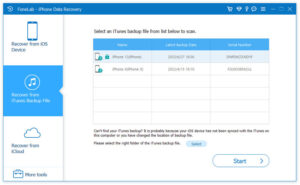
After the scan is complete, select Viber-related data types in the left panel. To quickly filter deleted files, check the “Show Only Deleted Items” option to narrow down the search scope.
After confirming the selected target files, click the “Recover” button to successfully extract and retrieve the deleted Viber photos and videos from the iTunes backup.
If you have enabled iCloud backup, you can accurately retrieve lost Viber media files from the iCloud backup using this recovery tool, with simple and efficient operations.
Detailed Operation Steps:
Launch the software on your computer and click the “Recover from iCloud Backup Files” option in the left function panel.
Enter your iCloud account information to log in. The software will sync and display all existing iCloud backup files. Find the backup containing Viber data and click the “Download” button on the right.
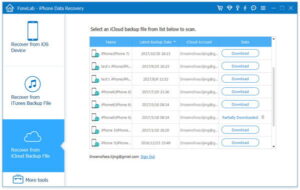
After the download is complete, the software will automatically start scanning. Once the scan is finished, all recoverable Viber files will be fully displayed. To quickly locate specific photos, enter the photo name or file path in the upper right search box.
Double-click the file to preview details, and click “Recover” after confirmation to successfully retrieve the deleted Viber photos and videos from the iCloud backup.
This iPhone data recovery software can be called a “data rescue tool” for iOS devices. It not only solves the problem of lost Viber photos and videos but also supports the recovery of various iPhone data types such as messages, contacts, and videos. Whether you have a backup or not, it can help you retrieve the required data in a time-saving and efficient way, completely eliminating the trouble of Viber data loss.

Copyright © 2025 DatasRecovery All rights reserved.
 iPhone Data Recovery
  iPhone Unlocker
  Android Data Recovery
  Broken Android Data Extraction
  Android Unlocker
  Data Recovery (Windows/Mac)


