By Data RecoveryUpdated on January 25, 2026
Viber is a popular VoIP (Voice over Internet Protocol) application, similar to Skype, allowing users to send free messages and make voice/video calls to other Viber users. As usage time increases, more and more Viber data such as chat records, photos, and videos accumulates on your phone, increasing the risk of accidental deletion or data loss. Backing up Viber data in advance is key to avoiding risks, but if you have already encountered data loss without a backup, there’s no need to panic – with the right tools, both text messages and media files can be efficiently retrieved.
This article will detail three Viber backup and restore solutions for iPhone users, meeting needs in different scenarios, allowing you to easily complete data recovery in 5 minutes.
If your needs are limited to backing up pure text messages in Viber without retaining media attachments like photos and videos, the built-in Viber backup feature on iPhone can meet your requirements. It should be noted that this method only supports text data, and media files cannot be synchronized for backup.
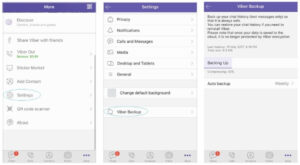
1.Open the Viber app on your iPhone and enter the main interface;
2.Tap “More” in the bottom menu bar, select “Settings” from the pop-up options, then navigate to “Account” → “Viber Backup” in sequence;
3.Tap the “Backup” button to start manual backup of text messages;
4.To enable automatic backup, select the “Auto Backup” option and set the automatic backup frequency to “Weekly” or “Monthly” according to your needs, eliminating the need for repeated manual operations.
1.Ensure your iPhone is logged into the corresponding iCloud account (files backed up by Viber through the built-in feature are stored in iCloud by default);
2.Reactivate the Viber app, wait for a moment after launching, and the app will automatically detect and load the previous backup data;
3.When the “Restore Now” option pops up on the interface, tap it to restore the backed-up Viber text messages from iCloud.
If you need to back up complete Viber data (including text chat records, photos, videos, attachments, and all other content), or have lost data without a backup, iPhone Data Recovery software is recommended. This tool supports operation on PC or Mac. Compared with the built-in feature, it not only backs up full data but also supports preview and selective backup/restore. Moreover, backup files are stored on the computer, without occupying iCloud space, and are more secure.
More importantly, the software provides three recovery modes. Even without any backup files, it can directly scan and retrieve deleted Viber data from the iPhone device, taking only a few minutes.


Full Data Support: Backs up and restores Viber messages, contacts, call logs, and various attachments (photos, videos, documents, etc.);
Preview and Filter Function: Preview all Viber data before backup or recovery, accurately select the target files you need, and avoid redundancy;
Multi-source Recovery: Supports direct scan and recovery from iOS devices, extraction and recovery from iTunes backups, and extraction and recovery from iCloud backups, flexibly adapting to different scenarios;
High Compatibility: Perfectly compatible with the latest iOS system and mainstream devices such as iPhone XS / XS Max / XR / X / 8 Plus / 8.
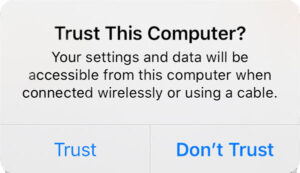
Download and install iPhone Data Recovery software, launch it, and connect your iPhone to the computer via a data cable; when the pop-up “Trust This Computer?” appears on the iPhone, tap “Trust” to ensure the device can be normally detected by the software;
The software defaults to the “Recover from iOS Device” interface. Tap the “Start Scan” button, and the software will fully scan Viber data in the iPhone (including deleted and existing files); if you only need to view deleted data, check the “Only show deleted items” filter box at the top;
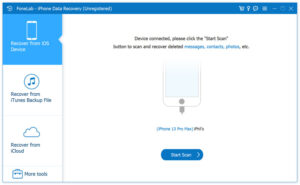
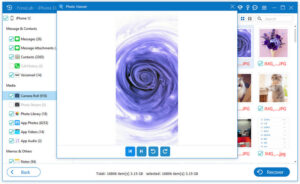
After scanning, under the “Messages & Contacts” category on the left, you can find “Viber Call Logs” and “Viber Chat History” options; double-click any file to preview details, check the file types you need to back up or restore, then tap the “Recover” button in the lower right corner;
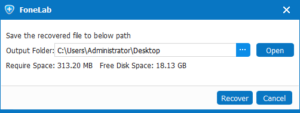
Select the target folder on the computer, click Confirm, and you can complete the backup or restore of Viber data (backup files will be saved to the specified folder, and restored data will be synchronized to the iPhone).
Software File List Supplementary:
After scanning, the software will display various application data (such as Kik, Line, WeChat, QQ, etc.) and media files (Camera Roll). Among them, Viber-related data includes “Viber (Chat Records)”, “Viber Attachments”, and “Viber Call Logs”. The total number of items and occupied storage space will be counted at the bottom.
In addition to the above two methods, you can also directly restore Viber historical data through iTunes or iCloud backups, but the traditional recovery method has obvious drawbacks: the recovery process is time-consuming, and the existing data on the iPhone will be overwritten by the backup files after recovery, resulting in the loss of existing data without backup, which is not worth the loss.
With iPhone Data Recovery software, this problem can be perfectly avoided: no need to directly overwrite data. First, download the backup files from iTunes or iCloud, extract all content, preview and select the Viber data you need to recover, and only recover the target files, which is both efficient and can protect existing data.
After launching the software, select the “Recover from iTunes Backup File” or “Recover from iCloud Backup File” option;
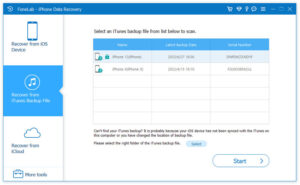
If you select iTunes Backup, the software will automatically list the iTunes backup files on the current computer (displayed in table form with name, latest backup date, and serial number). Select the corresponding backup file and tap “Start”;
After the software extracts the backup file, follow the “Preview – Select – Recover” process in Section 2 to complete the selective recovery of Viber data, which only takes a few steps and can be completed in a few minutes.
Whether you need to back up Viber data daily or urgently retrieve deleted messages and media files, the above three solutions can meet your needs.iPhone Data Recovery software also combines core advantages such as full backup, recovery without backup, and no data overwriting, making it the preferred tool for iPhone users to manage Viber data. In addition, the software also supports recovering deleted data from other applications such as Kik, WeChat, and QQ, which is highly practical.

Copyright © 2025 DatasRecovery All rights reserved.
 iPhone Data Recovery
  iPhone Unlocker
  Android Data Recovery
  Broken Android Data Extraction
  Android Unlocker
  Data Recovery (Windows/Mac)


