By Data RecoveryUpdated on January 25, 2026
Kik is a popular instant messaging app favored by iOS and Android users. Thanks to its anonymity feature, it has become the go-to choice for many users to send messages, photos, GIFs, and videos. However, it’s important to note that when you log out of Kik, uninstall the app, or actively delete messages, the relevant data will be removed from your device. If you accidentally lose important Kik messages, there’s no need to panic. This article will detail 6 practical recovery methods to help you retrieve key information.
Many users worry that deleted Kik messages cannot be recovered, but this concern can be put to rest. Although Kik does not store chat records on its servers—once messages are deleted, users log out, or the app is reinstalled, the messages stored locally on the device will be removed—there is still a chance to retrieve these lost messages through proper methods. The following sections will elaborate on 6 effective ways, including checking chat history, using professional data recovery software, and restoring from device backups.
Kik has certain limitations on message storage: it only retains messages from the past 48 hours, and the storage quantity is affected by the phone’s memory—about 1,000 messages for iPhone devices and 600 messages for Android devices.
If your chat records do not exceed the above time or quantity limits, you can view old messages directly within the Kik app; however, if you have uninstalled the app before, the local history will be cleared, and you can only ask the chat recipient to check the relevant records on their device. The specific operation steps are as follows:
Step 1:Open the Kik app on your phone;
Step 2:Enter the corresponding chat window;
Step 3:Swipe up on the screen to browse old messages.
If you accidentally deleted Kik messages on your iPhone, you can try to recover them through the following 3 methods: using professional data recovery software, restoring from iCloud backup, and retrieving from iTunes backup.


iPhone Data Recovery is an excellent choice for recovering Kik messages. Whether you have a backup or not, it can efficiently scan and recover deleted or lost Kik messages, suitable for various scenarios.
This software offers the following core advantages:
1.No prior backup required; directly recover deleted Kik messages from iPhone;
2.Supports previewing old Kik messages before recovery for precise selection;
3.In addition to Kik messages, it can also recover various deleted data such as notes, text messages, contacts, and Safari bookmarks on demand;
4.Compatible with various iOS devices and different system versions.
Specific operation steps:
Step 1:Download and launch the software on your Mac or Windows computer.
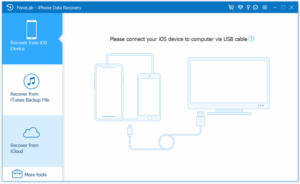
Step 2:Connect your iPhone to the computer using a compatible USB cable, and the software will automatically select the “Recover from iOS Device” mode;
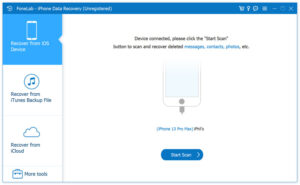
Step 3:Once the software successfully detects your iPhone, click the “Start Scan” button at the bottom. After the scan is complete, check “Kik” in the “Applications” list, and the right panel will display all deleted Kik messages;
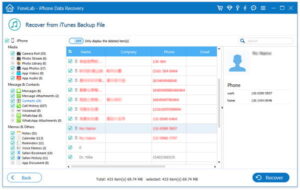
Step 4:Preview and select the messages you need to recover, click the “Recover” button in the upper right corner, choose the storage path for the messages, and click “Recover” again to view the recovered Kik messages on your computer.
If you have previously backed up your iPhone data to iCloud, you can retrieve Kik messages from the backup by following these steps:
Step 1:First, factory reset your iPhone: Open “Settings” > “General” > “Transfer or Reset iPhone”, select “Erase All Content and Settings”, and follow the on-screen prompts to complete the operation;
Step 2:Tips: It is recommended to back up important data on your current iPhone to another storage location in advance to avoid data loss.
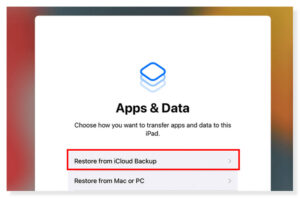
Step 3:Complete the initial setup of your iPhone as guided. When entering the “Apps & Data” interface, select “Restore from iCloud Backup”;
Step 4:Select the backup file containing the target Kik messages and wait for the restoration process to finish.
If you have backed up your iPhone data via iTunes (or Finder), you can recover Kik messages by following these steps:
Step 1:Connect your iPhone to the computer using a USB cable and launch iTunes or Finder;
Step 2:Click the device icon and select the “Restore Backup” option;
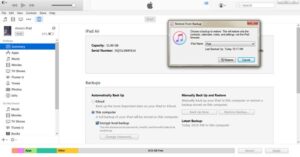
Step 3:Select the backup file containing the deleted Kik messages;
Step 4:Click the “Restore” button and wait patiently for the recovery to complete.
Kik messages are also stored locally on Android devices. After deleting chat records, logging out, or uninstalling the app, the data will be removed, but it can still be recovered through professional software or device backups.
Android Data Recovery is designed specifically for Android devices. It can recover deleted or old Kik messages without a backup, and also supports recovering deleted text messages, compatible with most Android phones and tablets.
The operation steps are as follows:
Step 1:Obtain the software through the official download channel and connect your Android device to the computer using a USB cable;
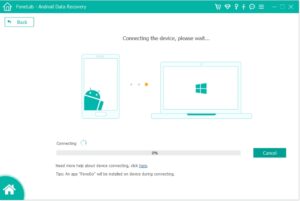
Step 2:In the new interface of the software, enable USB debugging on your Android device according to the prompted steps;

Step 3:After enabling USB debugging, the software will display a list of file types. Check the “Messages” option and click “Next”, and the software will start scanning for Kik messages (for Samsung phones, click “Allow/Authorize/Grant” when the authorization prompt pops up);

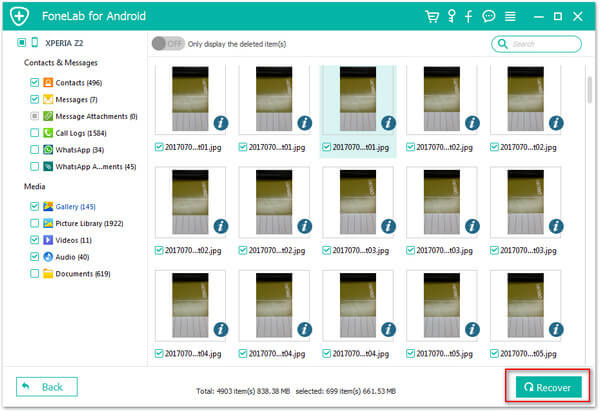
Step 4:After the scan is complete, find the Kik messages you need to recover on the results page, click the “Recover” button and select the output folder to complete the message restoration.
If you have previously created a system backup on your Android device, you can recover Kik messages through the following steps:
Step 1:Open the “Settings” of your Android phone and find the “System” or “Backup & Restore” option (the path may vary slightly for different brand devices, but it can be found in “Settings”);
Step 2:Select “Local Backup” or “Cloud Backup” and find the backup file created before the Kik messages were deleted;
Step 3:Click the “Restore” button and follow the on-screen prompts to complete the operation.
Frequently Asked Questions About Recovering Deleted Kik Messages
Question 1: Does Kik automatically delete messages?
Yes. Kik automatically deletes chat records after 48 hours by default. Due to limitations in its own backup storage, it is recommended to use third-party backup tools to save important messages.
Question 2: Will deleted Kik messages disappear permanently?
Not necessarily. Kik does not store chat records on its servers, and deleted messages will be removed from your device. However, if the messages are still within the storage limit of Kik’s local history or you have created a device backup before, there is still a chance to retrieve them; otherwise, the messages may be permanently deleted.
Question 3: How to sync Kik messages to a new iPhone?
You can sync Kik messages to a new iPhone by taking screenshots to save the messages or using iCloud backup.
This article details 6 methods to recover deleted Kik messages applicable to iOS and Android devices, covering various scenarios such as directly checking history records, using professional data recovery software, and restoring from device backups. If you successfully retrieved lost Kik messages using the methods in this article, feel free to share it with friends in need.

Copyright © 2025 DatasRecovery All rights reserved.
 iPhone Data Recovery
  iPhone Unlocker
  Android Data Recovery
  Broken Android Data Extraction
  Android Unlocker
  Data Recovery (Windows/Mac)


