By Data RecoveryUpdated on June 23, 2026
If you plan to sell, gift, or trade in your old iPhone, simply deleting photos, contacts, or apps cannot fully protect your privacy. Manually removed files can be easily recovered via common data recovery software. If you want to permanently erase all personal records, bank credentials, login passwords and Apple account traces, you need reliable methods to erase iPhone data without restore. This post covers three proven solutions, including professional PC-based wiping software, native iPhone built-in functions, and remote iCloud erasure. We highlight the safety difference of each method to help you complete permanent iPhone data erasure without full factory restore.
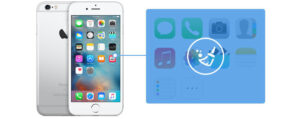
Aiseesoft FoneEraser is a professional iOS data wiping utility designed to erase iPhone data without restore, making all deleted information unrecoverable. It supports all iPhone, iPad, iPod touch models, compatible with iOS 10.3 up to the latest iOS 26. Three-tier security erasure modes match different privacy demands, and batch multi-device wiping is supported to save operating time.
All data types can be completely cleared: contacts, SMS, iMessage, call logs, calendars, notes, photos, videos, Safari bookmarks, app cache, locked screen passcodes, banking transaction records and all private sensitive data.


1、Download, install and launch the software on Windows or Mac PC. Activate full functions with your registered email and license code if required.
2、Connect iPhone to computer via original USB cable, unlock your phone and tap Trust This Computer on the pop-up window, then input screen lock password to authorize access.
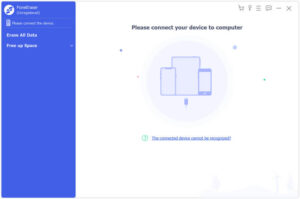
Tip: If the PC fails to detect your iOS device, update iTunes to the newest official version from Apple’s website.
3、Select erasure security level (Low / Medium / High)
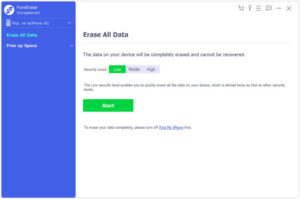
Low Level: Fastest wiping speed, twice as efficient as other modes, suitable for clearing non-sensitive daily files.
Medium Level: Fully overwrite residual deleted data; ordinary recovery tools cannot retrieve files, ideal for second-hand iPhone resale.
High Level: Complies with US DoD 5220.22-M military data destruction standard, thoroughly eliminates passwords, financial records and confidential private data for high privacy scenarios.
4、Confirm and start one-click erasure
After selecting the mode, click Start, enter verification code 0000 in the pop-up window, then tap Erase to fully wipe all iPhone content and settings.
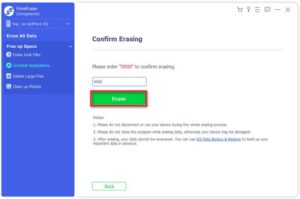
Do not disconnect the device during wiping; unexpected interruption may cause iPhone system failure.
Once data is wiped, it is permanently lost with zero recovery possibility. Back up all important files via iCloud or computer in advance if needed.
Turn off Find My iPhone before erasing to guarantee smooth operation.
1、Open Settings > Tap your Apple ID at the top > Find > Disable Find My iPhone, verify with your Apple ID password.
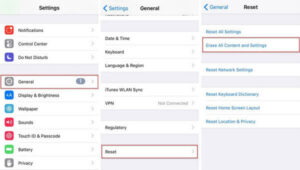
2、Return to Settings homepage > General > Transfer or Reset iPhone.
3、Tap Erase All Content and Settings.
4、Enter screen lock password, choose to retain or delete eSIM as needed, then tap Erase iPhone to confirm.
5、The phone will auto-restart and finish data clearance, then jump to the new device activation page.
1、Visit icloud.com via any browser and log in with the Apple ID bound to the lost iPhone.
2、Click Find iPhone > All Devices, select the target iPhone from the device list.
3、Choose Erase iPhone, input Apple ID password to confirm remote wiping.
4、Once the iPhone connects to the internet later, full data erasure will execute automatically.
Protecting personal privacy is essential before disposing of old iPhones or handling lost devices. If you want to safely erase iPhone data without restore, Aiseesoft FoneEraser is the top secure permanent data destruction solution with multi-grade safety options. For quick casual reset, you can use iOS native factory wipe. Remote iCloud erasure works for emergency data clearance when the phone is not in hand. Remember to back up all valuable files before any data wiping operation.
Sorry the comment has been closed.
Copyright © 2025 DatasRecovery All rights reserved.
 iPhone Data Recovery
  iPhone Unlocker
  Android Data Recovery
  Broken Android Data Extraction
  Android Unlocker
  Data Recovery (Windows/Mac)