By Data RecoveryUpdated on March 18, 2026
After getting a new Android phone, transferring contacts between Android devices has become a top priority for many users. It is not only necessary to ensure the integrity and non-loss of contact information, but also to expect simple operation and fast transmission speed. Many users find that data migration between Android devices is more complicated than that of Apple devices. Ordinary transmission methods can only process files such as photos and videos, but encounter obstacles in cross-device contact migration on Android. Even conventional methods such as Bluetooth cannot meet the demand due to low transmission efficiency and adaptability issues. This article focuses on Android contact transfer, sharing practical and efficient methods for everyone to easily realize cross-Android device contact migration, and at the same time complete the transmission of other data such as short messages and call records synchronously.
The Professional and Optimal Solution for Transferring Contacts Between Android Devices
To complete contact transfer between Android devices efficiently and completely, a professional Android data transmission tool is the first choice. Here we highly recommend MobieSync. This tool has been specially optimized for Android contact transfer, and also supports cross-device transmission of multiple data types, making it an excellent choice for Android phone replacement and data migration.
MobieSync – The Preferred Tool for Android Contact Transfer
✅ Perfectly supports Android contact transfer, and can transmit all commonly used data types such as photos, videos, audio, short messages, voice memos, call records and so on at the same time
✅ Supports contact migration between Android devices, and also realizes cross-platform contact and file transmission from Android to iPhone and from iPhone to Android
✅ Can transfer contact and other data from computer to Android/iOS devices, and also back up contacts from Android/iPhone to computer to prevent information loss
✅ Can directly view and manage contact information in Android and iPhone devices, and support editing and sorting duplicate contacts
✅ It also has powerful ringtone production and HEIC format conversion functions to meet more mobile phone usage needs
Specific Steps to Transfer Contacts Between Android Devices with MobieSync
Step 1:First, download, install and launch the MobieSync software for free on the computer, and complete the basic installation operation according to the prompts on the computer screen. The process is simple and easy to operate.

Step 2:Connect both the old Android device and the new Android device to the computer with a USB data cable. The software will automatically identify the two devices and display the basic information of the devices on the operation interface without manual matching.
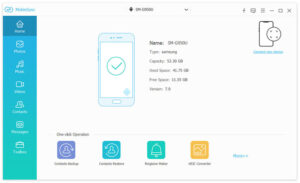
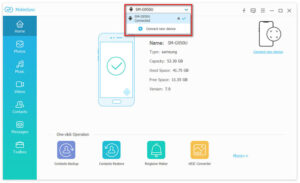
Step 3:Set the old Android phone storing contacts as the source device, click the device model in the center of the top of the interface, and select the corresponding old device from the drop-down list to complete the source device setting.
Step 4:The left sidebar of the software will be clearly listed by data category. Click the Contacts option directly, and the right window will display the detailed information of all contacts in the old device, including name, phone number, notes and so on.
Step 5:Select all the contacts to be transferred in the contact list (one-click full selection is available), click the “Export to Device” button on the interface, select the new Android device as the receiving end, and then you can start cross-device transmission of Android contacts. No manual intervention is required during the whole process, just wait for the transmission to complete.
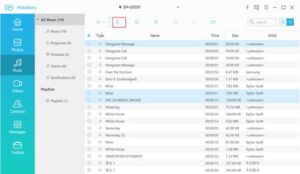
MobieSync can not only efficiently complete contact transfer between Android devices, but also migrate other data such as short messages and photos synchronously. It also supports mutual contact transmission between Android and iPhone, as well as contact backup and transmission between computer and mobile phone, solving all device contact management and migration needs in one stop.
Other Auxiliary Android Contact Transmission Methods
If you only need to transfer a small number of contacts, you can also use Bluetooth or Near Field Communication (NFC). The operation is simple and no computer is needed. It is suitable for emergency transfer of a small number of Android contacts. However, these methods have low transmission efficiency and cannot batch organize and manage contacts, so they are more suitable for temporary use.
Summary
After replacing a new Android phone, transferring contacts between Android devices is one of the core needs. To complete contact migration completely, efficiently and in batches, professional data transmission tools such as MobieSync are the best choice, which can ensure that contact information is not lost, the transmission speed is fast, and the migration of other data can be processed synchronously. Bluetooth, NFC and other methods can be used as auxiliary to meet the emergency transmission needs of a small number of contacts. Choosing the method that suits you allows you to easily complete the contact migration operation of Android phone replacement.


 iPhone Data Recovery
  iPhone Unlocker
  Android Data Recovery
  Broken Android Data Extraction
  Android Unlocker
  Data Recovery (Windows/Mac)