By Data RecoveryUpdated on February 11, 2026
Many users are troubled by the problem of data migration from Android to iPhone when changing devices. Cross-platform transmission not only needs to solve the compatibility problem of file formats of different systems, but also may face the potential risks of data loss and leakage. In fact, it is not difficult to complete this operation safely and efficiently. Choosing the right method can make the migration process twice as effective with half the effort. This article collates 3 highly practical methods for transferring data from Android to iPhone with detailed operation steps, helping you complete data migration easily and ensure the safe transmission of all kinds of important information.
MobieSync is an all-in-one tool specially designed for cross-device data transmission, which perfectly solves the demand for Android to iPhone migration. With just a few simple operations, you can synchronize and transfer various types of data between computers, Android devices and iOS devices. As an all-round device management tool, it supports the fast migration of contacts, text messages, audio and video files, making it an excellent choice for preserving important data when switching phones.
Core Features:
1.Realize free file transfer from Android to iPhone;
2.Support migration of multiple types of data including photos, videos, music, contacts and text messages;
3.Manage iOS/Android device data such as classification, deletion, merging and preview;
4.Compatible with the latest iOS 18 and Android 16 systems;
5.Provide a 30-day money-back guarantee.

Operation Steps
Step 1:Install and launch MobieSync on your computer, connect your Android phone to the computer via a USB data cable, and the tool will automatically recognize the connected Android device;
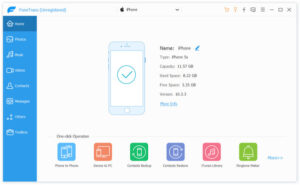
Step 2:The left side of the software’s main interface will display all files in the Android phone by category, and check the various data that need to be migrated to the iPhone;
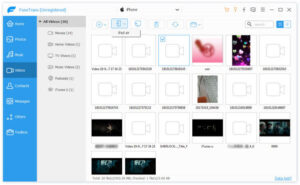
Step 3:After checking, click the “Export to Device” button to start synchronization, and the file transmission can be completed within a few seconds.
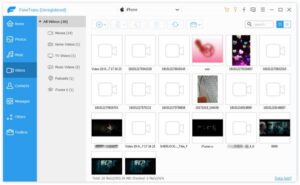
With MobieSync, data migration from Android to iPhone is no longer cumbersome. Compared with manually transferring data one by one, this one-click transmission tool can save a lot of time and make the migration process more convenient.
Move to iOS is an exclusive migration tool launched by Apple officially for Android to iPhone, designed to solve the problem of cross-platform device data transfer and realize seamless data migration from Android to iPhone. This app has a simple and easy-to-use interface, and can safely migrate contacts, text messages, photos and other types of data during the initial setup phase of a new iPhone. Regardless of the size of the data volume, it can ensure no data loss during the migration process.
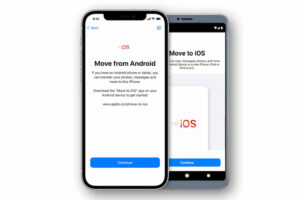
Core Features:
1.Support transferring contacts, text message records, photos, videos and other data from Android to iPhone;
2.Adapt to high-speed network transmission of up to 5GHz to improve migration efficiency;
3.Transmit high-definition photos over 2GB in a single file to meet the migration needs of large-capacity media files.
Operation Steps:
Step 1:Install and open Move to iOS on your Android phone and new iPhone respectively, and click “Continue” on both devices; then enter the 12-digit verification code displayed on the iPhone screen on the Android phone to complete device pairing;
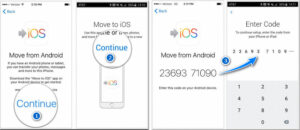
Step 2:After successful pairing, check the files to be transferred on the operation interface of the Android phone, click “Next” in the upper right corner of the interface, and wait for the file transmission to complete.
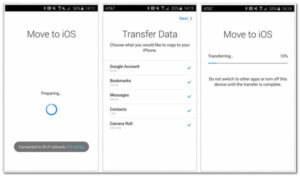
With Move to iOS, most types of data can be easily transferred from Android to iPhone. However, it should be noted that this official app may occasionally experience stuttering or abnormal operation, and you can back up your data in advance before use.
If you prefer to use traditional methods for cross-platform data migration, iTunes is a suitable choice. iTunes is not only Apple’s official platform for purchasing and downloading audio and video content, but also a powerful cross-device file transfer tool. Through its synchronization function, you can also make the media library of your iPhone more organized for easy access later. However, using this method requires backing up Android data to iTunes first.
Core Features:
1.Store various files such as music, photos and videos, serving as a transfer station for Android to iPhone data migration;
2.Support playing songs in iCloud cloud to realize the linkage between cloud and local data;
3.Customize and adjust music playback quality to enhance the listening experience;
4.Listen to various online radio stations online, with both entertainment and practical attributes.
Operation Steps:
Step 1:Install the latest version of iTunes software on your computer;
Step 2:Connect your Android device to the computer with a data cable, and first transfer the Android data to be transmitted to the local computer; after the transmission is completed, connect the iPhone to the computer and launch iTunes;
Step 3:Drag the local files of the computer to the iTunes interface, select the connected iPhone device in the software, and click the “Sync” button to synchronize the files to the iPhone.
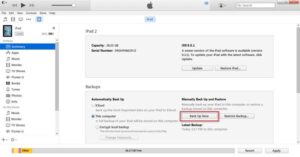
Overall, iTunes can be used as a transfer tool for Android to iPhone data transmission, but its core function is the management and organization of media content, not a professional cross-platform data migration tool, so there are certain limitations in data transmission. For example, it is impossible to selectively transfer a single song, a single album or a playlist, and only the entire media library can be synchronized.
This article introduces three data transmission methods from Android to iPhone in detail, and users can choose flexibly according to their own usage habits and needs. Among them, both Move to iOS and iTunes have certain limitations in actual use, while Aiseesoft MobieSync, as a professional cross-device data transmission tool, can perfectly solve these problems and take into account the convenience, security and comprehensiveness of transmission. If you want to realize the complete and lossless migration of various media files and data in the process of switching from Android to iPhone, Aiseesoft MobieSync is undoubtedly the best choice.


Copyright © 2025 DatasRecovery All rights reserved.
 iPhone Data Recovery
  iPhone Unlocker
  Android Data Recovery
  Broken Android Data Extraction
  Android Unlocker
  Data Recovery (Windows/Mac)