By Data RecoveryUpdated on January 30, 2026
iPhones usually store a lot of crucial data, such as music, videos, contacts, text messages, e-books, and more. To store and organize these contents smoothly, a reliable iOS file management tool is essential. Today, we recommend a practical iPhone manager—FoneTrans. It allows you to easily view, edit, add, and export iPhone data on your computer, and even supports app uninstallation and data backup & restoration, helping you get rid of data management troubles.

As a solid iOS device management software, FoneTrans not only enables media file transfer between iPhone/iPad/iPod and Windows/Mac computers but also supports practical additional features like direct phone-to-phone transfer, contact backup & restoration, HEIC to JPG photo conversion, and custom iPhone ringtone making, meeting data processing needs in various scenarios.
Core Feature Highlights:
1.Bridge the data flow between iOS devices, computers, and iTunes for seamless data transfer;
2.Automatically convert HEIC photos to JPG format during transmission, no extra tools required;
3.Intuitively view core phone data including text messages, call logs, Safari bookmarks, and calendars;
4.Provide full-cycle contact management, supporting backup, online viewing, and one-click restoration;
5.Extract clips from any music track to quickly create custom ringtones compatible with iPhones.
Advantages:
1.Built-in ringtone making function to meet personalized needs;
2.Supports one-click data transfer, with simple and efficient operation without complicated steps.
Areas for Improvement:
1.Relatively limited feature coverage, unable to meet some advanced needs;
2.Only supports wired transfer, no wireless connection function available yet.
Operation Steps:
Step 1:Download and install: Download the corresponding version according to the computer system (Windows/Mac), install and launch the tool, the system will guide you to connect the device


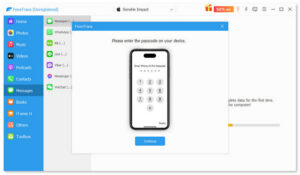
Step 2:Device connection: Connect iPhone to computer with Apple’s original Lightning data cable, unlock iPhone and click “Trust”, enter the password to complete verification
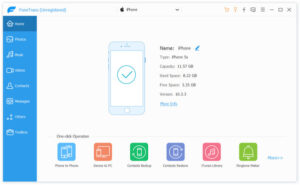
Step 3:View and manage: After the tool recognizes the device, it will display iPhone name, capacity, iOS version and other information, and all file categories can be viewed in the left panel
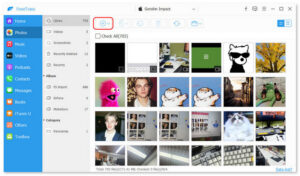
Step 4:Start transfer: Select the type of file to be transferred (such as “Photos”), click the “Add” button, and select files from the computer to complete the upload; for reverse transfer, select files in iPhone and click “Export to Computer”
Overall, FoneTrans is a cost-effective iOS data management tool. Whether you need to migrate phone data to a computer, or import, export, or delete iPhone contacts, photos, music, and other contents, it can be completed easily without tedious processes. For iOS users pursuing simplicity and efficiency, it is undoubtedly an ideal choice for data management.


Copyright © 2025 DatasRecovery All rights reserved.
 iPhone Data Recovery
  iPhone Unlocker
  Android Data Recovery
  Broken Android Data Extraction
  Android Unlocker
  Data Recovery (Windows/Mac)